 Français
 English
 Español
ChatGPT
- Open Settings → Apps & Connectors.
- Find EBY in the directory, or create a connector with the URL above (developer mode).
- Sign in to EBY and click “Authorize”.
MCP connector · ChatGPT · Claude
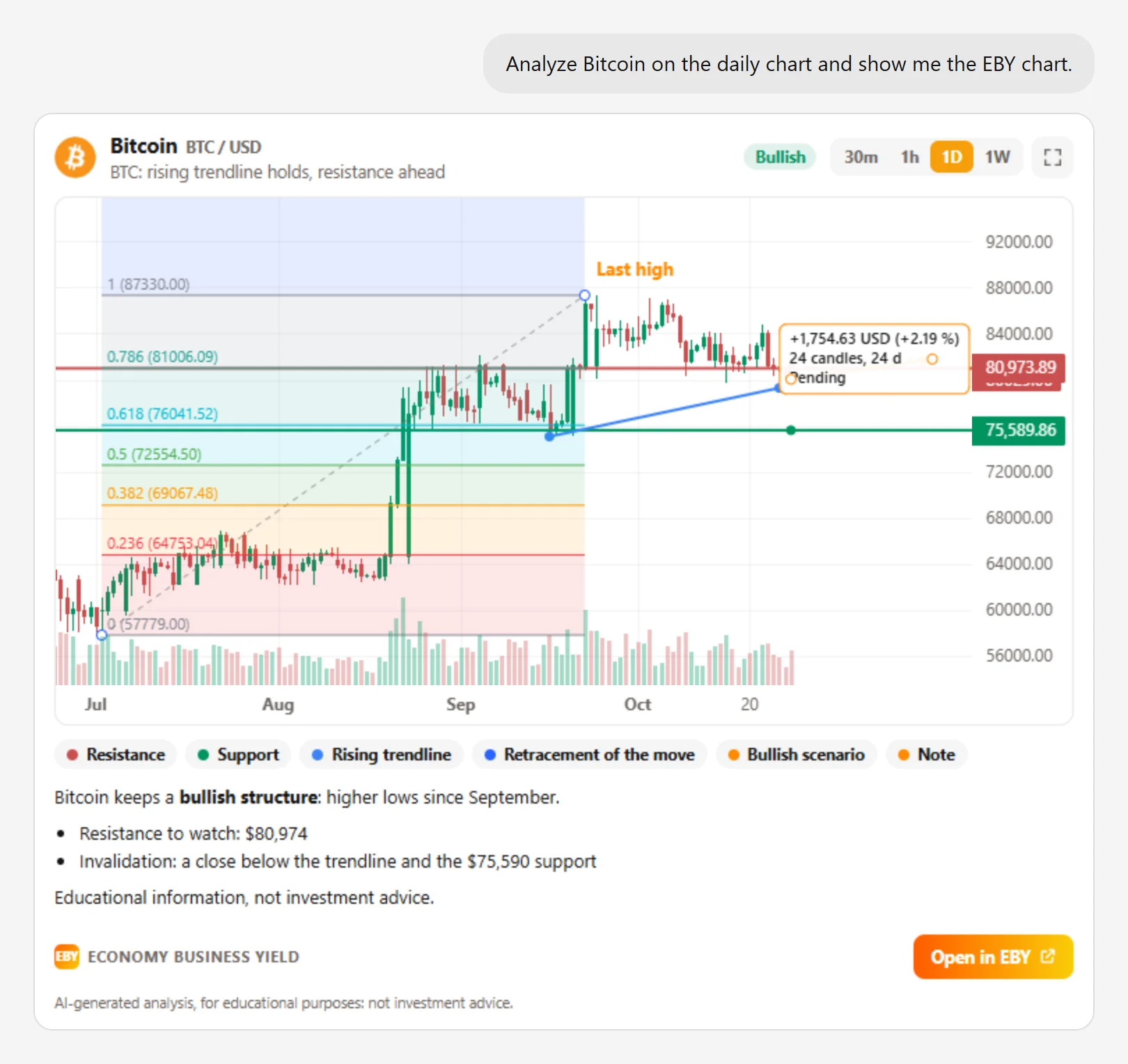
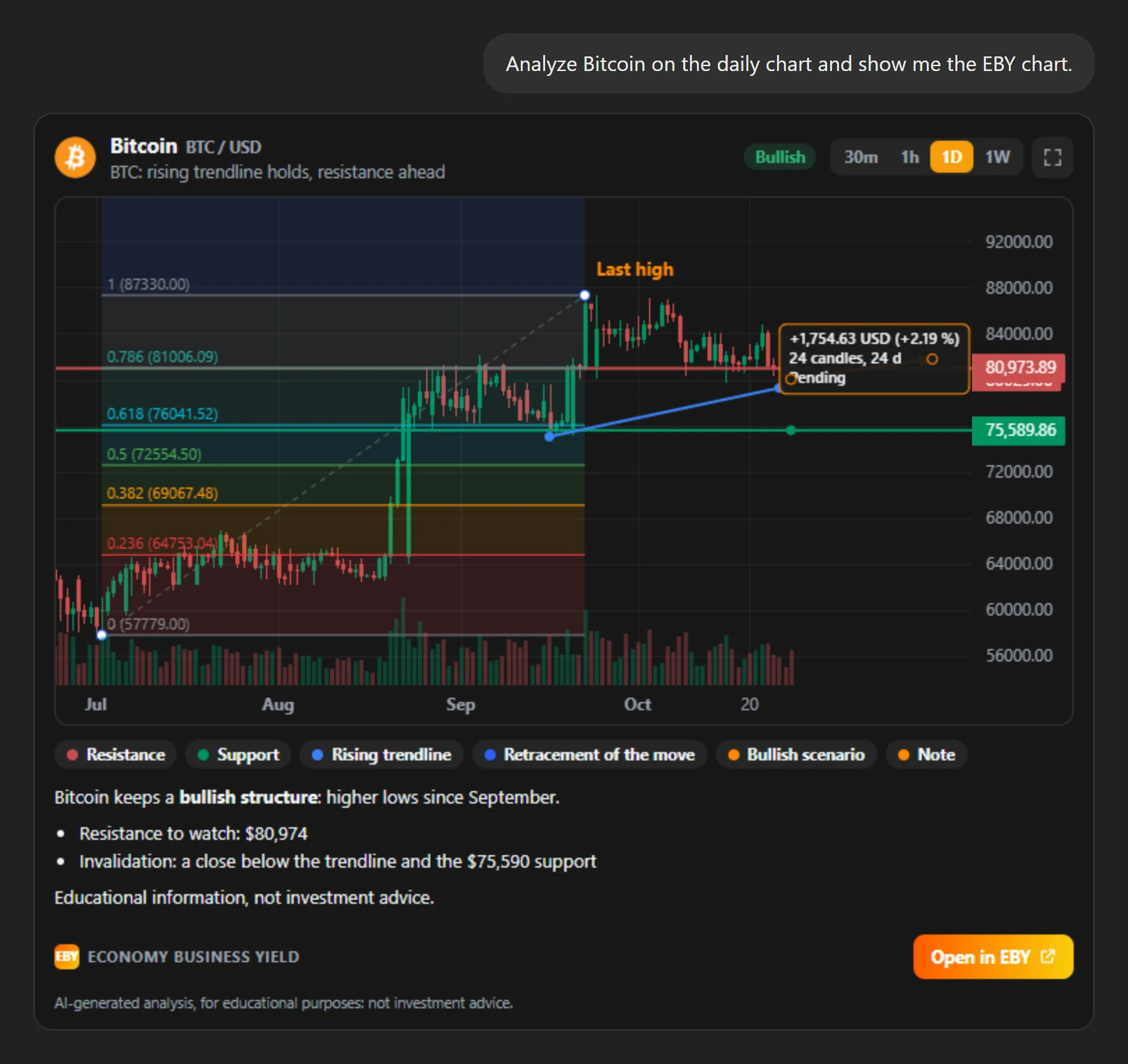
Connect your EBY account to your AI assistant: it reads EBY market data, shows our chart right in the conversation and draws its analysis on it, line by line.
Once, in a minute. You need an EBY account (free).
Any MCP-compatible assistant (remote server, OAuth sign-in) can connect with the same URL.
Your connected apps are listed in EBY, Settings → Applications.
The assistant picks the right tool for your question. Write tools only touch your alerts and your analyses.
| Tool | What it does | Access |
|---|---|---|
| Crypto prices | Price, change, market cap and volume of Top 100 coins. | Read |
| Crypto market overview | Total market cap, BTC and ETH dominance, top gainers and losers, highest volumes. | Read |
| Price history | Price change over a period, with dated high and low. | Read |
| Chart analysis | Structure, support and resistance, RSI, MACD, moving averages, Bollinger, volume. | Read |
| Show the analysis on the EBY chart | The EBY chart appears in the conversation and the assistant’s drawings are drawn on it. | Read |
| EBY news | Latest articles published on EBY. | Read |
| My simulated portfolios | Positions, value and performance of your virtual portfolios. | Read |
| My price alerts | Your alerts with their threshold, status and last trigger. | Read |
| My EBY account | Subscription, credits and account security. | Read |
| My EBY charts | The tabs and charts of your Analysis page, with their drawings. | Read |
| Read my chart | Technical analysis of one of your charts, with the drawings already on it. | Read |
| Draw on my chart | Adds drawings to your Analysis page: saved, visible live and shown in the conversation. | Write |
| Change my chart view | Cryptocurrency, timeframe and indicators of one of your charts. | Write |
| Delete AI drawings | Deletes the drawings made by the assistant, never yours. | Write |
| Create a price alert | Email alert when a coin goes above or below a USD price. | Write |
| Delete a price alert | Deletes one of your price alerts. | Write |
| Save the analysis to EBY | The chart’s “Open in EBY” button: the analysis becomes a tab of your Analysis page. | Write |
OAuth sign-in: you approve access on EBY, your password is never shared with the assistant. Two-factor authentication is required if enabled.
The assistant only receives what it requests to answer you. EBY does not receive the content of your conversations.
No buying, selling or transfers: EBY portfolios are simulated.
Remove access at any time in Settings → Applications: it stops immediately.
Details in our Privacy Policy and our terms of use.
Yes: it is included in every EBY account, including the free one. On the assistant side, connector support depends on your ChatGPT or Claude plan.
Only what it requests from EBY to answer you: market data, technical analyses, your simulated portfolios, your alerts and a summary of your account (first name, subscription, credits). Never your email address, your password or your payment details.
No. EBY executes no transactions: portfolios are simulated, and the only possible actions concern your price alerts and your Analysis page charts (drawings, view).
Yes, like the Eby assistant on the site: it reads your Analysis page charts with your drawings, adds its own drawings (marked AI, visible live if the page is open), changes the cryptocurrency, timeframe or indicators, and can delete its own drawings. Your drawings are never modified.
In EBY, open Settings → Applications and click “Remove access”: the assistant loses access immediately. You can also remove the connector in ChatGPT or Claude settings.
No. Analyses are produced by the assistant’s model from EBY data, for educational purposes. They are not investment advice: crypto-assets are volatile and you can lose part or all of your capital.
A question or an issue with the connector? support@economy-business-yield.com
It is in your moments of decision that your destiny is shaped.Create a free account